Here is the short answer: the best mechanical keyboard for most hybrid workers is a compact, wireless 75% model with hot-swappable switches, reliable Bluetooth, and a USB connection for charging or backup. The Keychron Q1, Keychron K2, Logitech G715, and NuPhy Air75 V2 cover most real-world needs without turning your desk into a keyboard showroom. The best mechanical keyboard is not automatically the loudest, heaviest, or most expensive one. It is the board you will happily use at home, in a coworking space, and occasionally in a café without irritating everyone within three tables.
Start with the life, then buy the gear. A keyboard that works beautifully in a fixed home office can be a miserable commuter if it weighs four pounds and needs a separate receiver. Likewise, an ultra-slim board can slide into a bag easily but lose the deep, cushioned feel that attracts people to mechanical keyboards in the first place.
What makes a mechanical keyboard worth buying?
Mechanical keyboards use individual switches beneath each key rather than a single rubber membrane. That design gives you a more distinct key press, easier customization, and usually a longer service life. The appeal is practical: a good board can make long writing sessions feel more controlled, while a familiar layout reduces the small pauses caused by hunting for keys.
For office work, look first at switch behavior. Linear switches press smoothly and tend to be the easiest choice for fast typing. Tactile switches provide a small bump that helps confirm each press without the sharp click of a typewriter. Clicky switches are fun at home and often terrible in a quiet office. The best mechanical keyboard for a shared room usually uses quiet linear or damped tactile switches, not the switch that produces the most impressive desk video.
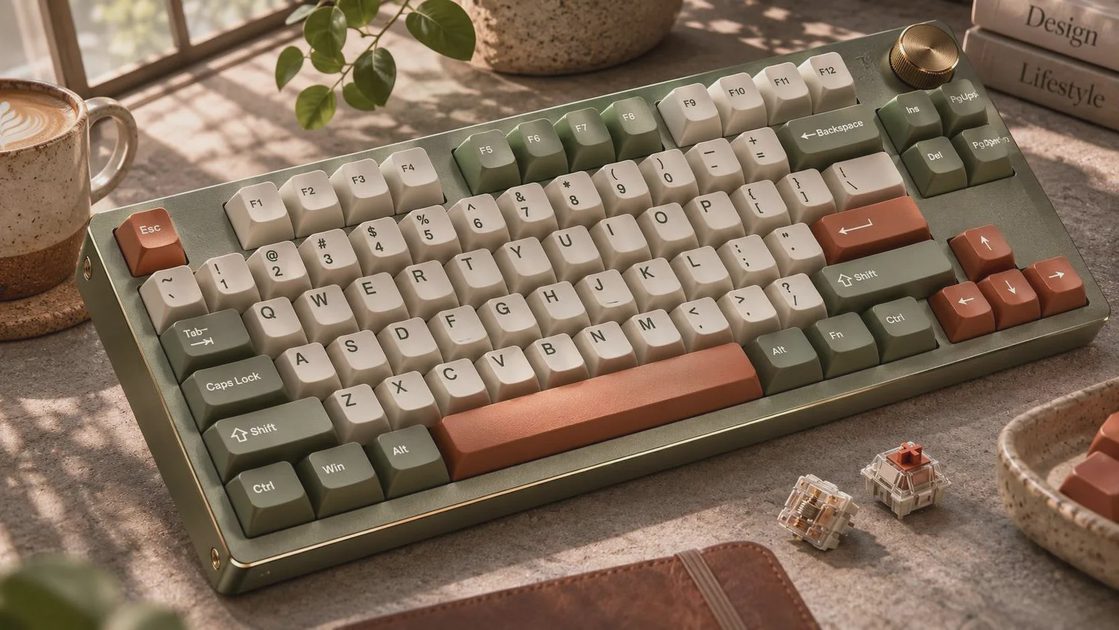
Pay attention to keycaps, too. PBT keycaps resist the shiny, greasy texture that cheaper ABS plastic can develop after months of use. A sculpted profile can feel comfortable, but replacement sets are easier to find for common layouts such as Cherry or OEM. Small details like adjustable feet, a detachable USB-C cable, and Mac and Windows legends matter more after week three than a dramatic product photo suggests.
The best mechanical keyboard by work situation
For a permanent home desk, the Keychron Q1 is a strong starting point. Its sturdy aluminum case, standard 75% layout, and hot-swappable switches make it a sensible platform for someone who wants a premium typing feel without designing a custom board from scratch. At roughly $170 to $220 depending on the version and sale, it is not a casual impulse purchase. It is good, but not magic: the weight is excellent on a desk and ridiculous in a commuter bag.
For a flexible setup, the Keychron K2 or K8 gives you Bluetooth, a familiar function row, and a more approachable price often around $80 to $120. The K2 saves space with a 75% layout, while the K8 keeps a traditional tenkeyless shape. Either can pair with a laptop, tablet, or desktop, which is useful when your workday involves moving between rooms. The best mechanical keyboard in this category earns its place by reducing cable swaps, not by winning a switch argument online.
For café work and train commutes, look at the NuPhy Air75 V2 or Logitech MX Mechanical Mini. Both are significantly easier to carry than a full-size metal keyboard. The NuPhy feels more like a low-profile enthusiast board, while the Logitech emphasizes office-friendly productivity and simple device switching. Expect to pay about $100 to $150. Bring a compact sleeve; loose keyboards in a backpack collect crumbs with the determination of a small appliance.
Choosing the right layout and switches
A full-size keyboard includes a number pad, which is useful for spreadsheets, accounting, and frequent data entry. If your work involves entering invoices all afternoon, losing those keys to save desk space is false economy. A tenkeyless board removes the number pad but keeps the navigation cluster and function row. It is a sensible middle ground for writing, coding, and general office work.
A 75% layout compresses the navigation area while keeping arrow keys and a function row. It is my default recommendation for small desks because it leaves more room for a mouse without forcing you to relearn every important key. A 65% board removes the function row and is wonderfully compact, but it asks you to use shortcuts more often. The best mechanical keyboard for a cramped apartment desk is frequently a 75% model because it balances space with ordinary usability.
Switch selection is personal, but the buying process does not need to become a graduate seminar. Choose linear red-style switches for smooth, quiet presses; tactile brown-style switches for a noticeable bump; and clicky blue-style switches only when noise is genuinely acceptable. If possible, buy a small tester kit for $10 to $20. Five minutes comparing switches is more useful than watching fifteen keyboard sound tests through headphones.

Wireless features, battery life, and compatibility
Wireless is valuable when it solves a real problem. Bluetooth lets one keyboard move between a work laptop, personal computer, and tablet, while a 2.4 GHz receiver can reduce latency for gaming. Some boards support three devices; others support five. That difference matters if your desk has a MacBook, Windows desktop, and iPad competing for attention.
Check whether the keyboard remembers operating-system layouts and whether switching requires a physical button or a function shortcut. Also confirm that the included receiver has somewhere to live. A tiny dongle disappearing into a backpack is not a technology problem; it is a Tuesday problem. USB-C charging is standard on most current boards, but battery estimates depend heavily on backlighting. RGB lighting looks excellent in a dark room and consumes more power than simple white backlighting.
The best mechanical keyboard for an office should still work when its battery is empty. A wired fallback prevents a low-charge warning from becoming an excuse to answer email on a laptop keyboard. Mac users should confirm Command and Option labels or remapping support. Windows users should check that media keys, Home, End, and the function row are easy to access.
How much should you spend?
Around $60 to $100 buys a competent entry-level board from brands such as Keychron, Akko, Royal Kludge, and Logitech. You should get a usable layout, hot-swappable options on some models, and basic wireless connectivity. This is the right range for a first purchase or a secondary desk. The best mechanical keyboard does not need a boutique case to improve your workday.
The $100 to $180 range is the sweet spot. You can expect better stabilizers, more consistent switches, improved keycaps, stronger cases, and more dependable firmware. NuPhy, Keychron, Logitech, and several enthusiast-focused brands compete here. Above $200, you are paying for materials, acoustics, design, or customization. Those upgrades can be enjoyable, but they are not productivity requirements.
Avoid buying a premium board before confirming that you enjoy the layout and switch type. I have watched customers return expensive keyboards because they disliked the height, not because the keyboard was poorly made. A $20 wrist rest or a lower-profile board can fix that problem more effectively than another upgrade.
A practical buying checklist
Before ordering, measure the desk space between your monitor stand and mouse. Confirm whether you need a number pad, then decide if the keyboard will travel at least once a week. For a café setup, keep the total weight near two pounds and choose quiet switches. For a home office, favor stability, repairable switches, and a comfortable typing angle.
Check the return policy, especially when buying a board with unfamiliar switches. Read whether keycaps use a standard stem, whether replacement parts are available, and whether the software works on your computer. If you use multiple devices, prioritize Bluetooth profiles over decorative lighting. If you play games, prioritize a wired mode or 2.4 GHz connection over an elaborate volume knob.
My overall pick for most people remains a wireless 75% keyboard such as the Keychron K2 or a similar model with quiet tactile switches. The best mechanical keyboard is the one that fits your actual week: stable at home, manageable in a bag, quiet enough for other humans, and simple enough that you stop thinking about it. That is the point of good gear. It should clear friction from the workflow, not become the workflow.


No letters yet — be the first guest to write.